
What is Juno?
The Juno Chrome extension was created to allow users to seamlessly interact with profiles they have either selected or created in Juno. The extension automatically syncs with Juno, allowing for a smooth transition between both platforms.
Interaction is conducted using an assigned shortcut. To interact, the user holds down the shortcut, which starts speech recognition within the browser. To end a session, the user can click the assigned shortcut once.
How It Works
Juno combines multiple AI services into a seamless voice interaction pipeline, from speech recognition through intent detection to natural response generation.
Speech Recognition
Web Audio API captures microphone input, sent to Google Cloud Speech-to-Text.
Intent Detection
Azure CLU returns top intent, entity, and confidence level from speech.
LLM Interaction
User's profile provides personality, context, and guidelines to the model.
Text-to-Speech
ElevenLabs generates natural speech using the user's selected voice.
Intent Recognition
The user's intent is detected using Azure's Conversational Language Understanding service, which takes a query in the form of text and returns the top intent, top entity, and confidence level.
Given the speech: "Open Google"
Top intent: Open Webpage
Top entity: Google
Confidence: 0.9
Profile-Based Personalization
After the user's speech has been retrieved, it's used to query the large language model. The user's selected prompt via their profile provides foundational context and background information, including personality, context, interaction guidelines, background, and temperature (variability in responses).
Once the LLM response is retrieved, ElevenLabs text-to-speech generates audio using the user's selected voice from their profile, creating a fully personalized interaction.
User Interface
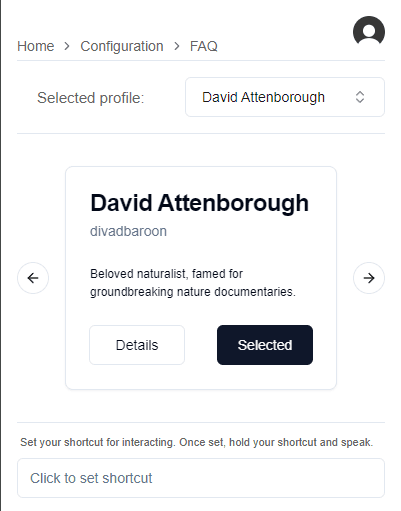
The user interface was designed to be clean and minimalistic. Shadcn was used for many components including the combo box, breadcrumb, and card display. From the main page, users can easily browse and select their profile, as well as assign their shortcut—the two main functionalities of the extension.
Technical Implementation
Built with Vite and React for fast development and optimal performance. The extension integrates multiple cloud services to deliver a seamless voice-to-voice AI experience.